Saturday, September 22, 2012

Citroën DS3 Cabrio

Driving alone would be boring, right?Releasing a new car can always lead to surprises. There are some categories and some cars whose history enables to have certain expectations, but each and every one always has at least a minimum potential of surprising its own brand. Some unfortunately end up as big failures even though being excellent products, but it’s interesting to observe that others hit the streets escaping from the existing “guaranteed-sales formulas” and turn out creating one of their own. This car is Citroën’s attempt to expand DS3’s unexpected success.

Citroën DS3 deserves this bigger credit because of all the context in which it was released. Fiat, Mini and Volkswagen were already enjoying the success of 500, Cooper and New Beetle specially in Europe, which was leading to firming them as members of a brand new category: the retro hatchbacks, whose bigger prices were compensated by cutting-edge technologies and plenty of luxury wrapped in 1950s-inspired designs. Since those three were having good sales, it was expected that more automakers joined them, like the French ones. Citroën was already preparing a car with their size and luxury level, but originally not to compete with them: their hatchback was meant to stabilish the DS line among the world, the brand’s division dedicated to create luxury alternatives to its own conventional vehicles. Therefore, DS3 was intended to be C3’s classier brother, making much bigger concessions to form over function, such as having only two doors and four seats, but also clearly expressing the common DNA, sharing platform and even some visible items, like the headlights. It didn’t take long to be very well-accepted, but the surprise came from the fact of this car starting to compete with the retro ones, even though DS3’s style is the exact opposite – from every angle it’s observed there’s something expressing sporty futurism, big or small.

Citroën DS3 CabrioIn fact, it’s even possible to infer that this market’s unknown flexibility was what motivated Audi to release A1 already one year after Citroën’s car, also using a modern design, and most recently Opel, with Adam’s mixture of old and new elements. This versatility is also being used by the convertible versions of these cars: Cooper uses a s cabriolet body, while 500C decided to keep the whole side panels and open only roof and rear windshield… just like this article’s car has now decided to present. DS3 Cabrio’s removable roof has electric operation, being able to stop as s closed, s removed and folded right above the trunk lid, and an intermediate option in which the fabric roof stays on the top, also folded in a way that resembles a spoiler – going between the extreme positions takes about sixteen seconds and can be done while driving at up to 75 mph. Although the pleasure of driving without roof is partially lost with this solution, it’s also important to notice that it keeps very much of the car’s safety untouched, because the structural changes are kept to a minimum. So if Citroën had no need to apply extensive stiffness reinforcements, it became free to invest on another topic which these cars’ customers find very interesting: Cabrio’s seats will have three color options, while the central console makes a contrast between piano black and six other options. And the roof, which looks exactly like the rigid ones when closed, can come in ten different fabric options.

Read more > Citroën DS3 Cabrio

Friday, September 21, 2012

Wie schütze ich meine Daten mit PBConnex und Securedoc?


Viele Firmen, aber auch Privatpersonen, sehen sich inzwischen gezwungen ihr Netzwerk und die Daten darin zu schützen um Schäden durch die Veröffentlichung der darin enthaltenen Informationen vorzubeugen. Der optimale und 100% sicheren Schutz existiert nicht und wird wahrscheinlich auch nie existieren. Dennoch ist es möglich seine Daten sehr sicher zu speichern und insbesondere das Netzwerk zu schützen.
PBConnex ist eine von vielen Netzwerksicherheitslösungen, die dafür sorgt, dass Daten und Dateien die sich in einem Netzwerk befinden vor unautorisiertem Zugriff geschützt werden. Bereits während dem Starten des Betriebssystems wird der jeweilige Nutzer mit dem Netzwerk verbunden und kann durch das Active Directory authentifiziert werden.
Eben dieses Active Directory sorgt dafür, dass der Zugriff und die Kontrolle für Administratoren viel einfacher und um einiges effektiver ist.
So kann dort entschieden werden auf welche Teile eines Netzwerkes ein Computer und der jeweilige Nutzer zugreifen kann. Auch Passwortänderungen sind sofort wirksam und werden auf allen Geräten des Netzwerkes angewendet.
Die Datenverschlüsselung funktioniert mit PBConnex selbst dann, wenn ein Gerät oder eine Festplatte aus dem Netzwerk entfernt wird.
Die Festplattenverschlüsselung mit der SecureDoc Full-Disk Encryption ist im Netzwerk ebenso zuverlässig wie auf einem alleinstehenden EDV-Gerät. Es werden nicht nur Festplatten geschützt, sondern auch jegliche Art von Wechseldatenträgern wie CDs, DVDs, USB-Datenträger und Speicherkarten.
Durch die verwendete AES-256-Verschlüsselung und weitere Kontrollmechanismen sind Daten dauerhaft und zuverlässig vor unerlaubtem Zugriff geschützt.
Auch für Unternehmen und andere große Netzwerke kann SecureDoc effektiv genutzt werden. Dazu kann vom SecureDoc Enterprise Server (SES) Gebrauch gemacht werden um den administrativen Aufwand zu minimieren. So wird auch die Installation und Einführung in ein größeres Netzwerk um einiges einfacher und kostengünstiger über die Bühne gehen.
Der Datenschutz mit PBConnex und SecureDoc ist sehr zuverlässig und kostengünstig. Die intuitive Benutzeroberfläche erlaubt es jedem die Vorgänge zu verstehen ohne extra geschult zu werden, was den Kostenaufwand für den Schutz des Netzwerkes weiterhin senkt.
Zuletzt entscheidet jedoch immer das persönliche Bedürfnis des Nutzers, ob Unternehmen oder Privatperson, darüber, was notwendig ist um seine Daten vor unerlaubtem Zugriff zu schützen.
Read more > Wie schütze ich meine Daten mit PBConnex und Securedoc?

Audi A3 Sportback and S3

Click here to see the high-res versionIt’s very common for an automaker to fraction an important product’s release, with the simple reason of wanting to attract bigger attention. It’s a matter of taking advantage from the fact that each “event” of the car world gets almost the same attention from the media, which results better to take the spotlights one novelty at a time rather than sharing only one time among several products. Audi did that showing at first the 3-door A3, to now also enjoy everyone giving those two following versions their own 15 minutes of fame.

Considering that this blog’s articles usually start commenting on the mentioned car’s design, this one can be started in a very expressive way if we quote Warhol one more time. After all, we’ve looked so much at Audi’s current visual identity that it does seem to have lost its meaning. To be clear, this so-called complaint doesn’t go to the company’s design structure at all, but to its excessive repetition. Every single latest Audi carries black backgrounded headlights with a LED line, with large air intakes beneath them and a trapezoidal central air intake between all that, carrying the license plate at half-height. The sides use square windows visually connected and rounded by a chrome line and two big folds at the body to make the same light-and-shadow effect, while the rear end uses horizontal tail lights with more LEDs forming different shapes and the other license plate among them. The other brands use different interpretations of their current style rules, like Chevrolet and Ford, but Audi only adapts the same ones to each car’s size. Sure, this makes sure everyone knows there comes an Audi, but nothing more than that. From the front end, at least, it’s getting each time harder to distinguish an A1, A3, A4, A6, A8

Audi A3 SportbackHowever, after that the compliments begin intensely. Hatchbacks usually offer their two possible body options as the same product only with two or four doors, but A3 makes a bigger difference between them. The Sportback version has increased at length and between-axles distance in order to give bigger trunk and internal space. This impression is confirmed by the exterior, who takes inspiration at its own previous generations by using three windows at the sides, LEDs at the trunk and even a roof rack, which is much more common at station wagons and minivans. Since all the sports potential has been concentrated at the three-door A3, the family parents who want to spice their Sportback a little must settle with the S-Line package who features the car at the pictures. This version also uses the brand new MQB platform, so the technical part mustn’t be different from its smaller brother. Using gasoline, Sportback’s diesel engines are 1.6 TDI with 105 hp and 2.0 TDI with 150 hp or 184 hp, with the main highlight going to the smaller one’s fuel consumption of 3,85 l/100 km. Among the gasoline options, there’s the TFSI team starting with the 1.2 and its 105 hp and followed by the 1.8 with 180 hp and the 1.4 with 122 hp or 140 hp – this one has a cylinder deactivation option, which brings itself the 4,76 l/100 km consumption.

Audi S3While Sportback is the most familiar variation of A3, it was also revealed the other extreme of this line. The new S3 never took too much attention because of exclusive design parts, and now makes it even less with its accessories being sold to any A3 through the S-Line kit. The interior has special seats with better body support and several name logotypes to spice up a sy-equiped room, but this car is correctly observed opening the hood. It was made an entire new 2.0 TFSI with technologies like 1,2 bar turbo, variable valve timing and direct injection to achieve 300 hp. There’s a new magnesium manual transmission with six speeds, but S-Tronic is still availabe as optional. S3 also brings Drive Select system, to adjust several driving parameters according to five modes: Auto, Comfort, Dynamic, Efficiency and Individual. All this power takes it from 0 to 96 mph in 5s1, while the top speed couldn’t escape from the German cars’ electronic limit. Even with high performance oozing through many details such as the four exhaust pipes, all those cutting-edge technologies allow it to acheive the 7,14 l/100 km consumption. At Germany it’ll cost € 38.900. Until now there’s nothing known about the new RS3 or even a Sportback version of any of them.

Read more > Audi A3 Sportback and S3

LG Optimus 4X HD review and specification


                   South Korean pioneer business conglomerate LG delivered many usefull, innovative and technologically premier products before and many are in their pipeline also to amaze the whole world. Though, at present they are just in the 2nd place in South Korea in terms of business, where another tech giant Samsung leading the board with great business worldwide.

                   This year in February, LG proudly announced their first Quad Core Processor powered smartphone at the Barcelona Mobile World Congress. Later in June (11-06-2012), they deployed this power-packed Optimus 4X HD in Europe. LG used latest 1.5 GHz Tegra3 processor, where manufacturer Nvidia encored a special fifth core with its regular quad core in Tegra3. This fifth core works while the mobile is in idle situation to save battery power. And thus makes this smartphone more efficient and active for regular use.

                   LG Optimus 4X HD uses LG’s newest interface OPTIMUS UI 3.0 for better and enhanced usability. Though, maybe this interface needs upgrades or replacement for better look and integrity, as many users and tech peoples are complaining about this with comparison to its other predecessors.
This phone has NFC TAG+ feature. There are 3 tags included in the box:- Car, Office and Sleep. You can use these tags to customize Optimus 4X HD with Tag+ apps to change settings as per TAG+ set up. After setting up, just tap the tag and the phone settings will change as per. You can attach the CAR TAG+ in your car and while driving, you can tap the tag and your phone will automatically change profile to driving mode.
Its Icon Customizer is another one of a kind unique feature that can add a special and personal expression to your smartphone. You can personalize icons and shortcuts with your favorite images from gallery and impress people around you.
LG Optimus 4X HD,Quad Core Phone,Dual Camera Mobile,Android Mobile
LG Optimus 4X HD

Here are detail specifications of LG Optimus 4X HD (specification may vary from region to region)…

Release Date: June 2012 (Introduced in February)

SIM System:Single GSM SIM

Network:
*2G: GSM/GPRS/EDGE : 850 / 900 / 1800 / 1900 MHz
*3G: UMTS/HSPA+: 850 / 900 / 1900 / 2100 MHz
*4G: NO

Build: 1.5 GHz Quad Core plus additional 500 MHz Battery saving Processor
*Processor: 1.5 GHz Quad Core Nvidia Tegra 3 T30/XMM6260 Processor plus additional Battery saving core of 500 MHz Processor
*GPU: 520 MHz Nvidia Tegra 3 ULP GeForce2
*RAM: 1GB DDR2 1066 MHz
*In-Built Memory: 16 GB (Up to 12 GB for User)
*Expandable Memory: MicroUSB Card support up to 64 GB

Body:  Sleek and wide body
*Dimension H x W x D: 132.4mm X 68.1mm X 8.9mm
*Weight: 141 gram
*Available Color: Black, White

Display: Big display with HD IPS screen for better viewing and gaming experience
*Size: 4.7 inch (11.9cm)
*Type: True HD IPS LCD Capacitive Full Touch Screen Display with Corning Gorilla Glass protection
*Screen Resolution: 720 x 1280 pixels @313 ppi
*Display Colors: 16.7 Millions

Camera: Dual Camera
*Main Rear Camera: 8.0 MP Full HD Auto Focus Camera with LED Flash and up to 8x Digital Zoom
*Image Resolution: 3264 x 2448 pixels (highest)
*Features: Touch Focus, Face Recognition, Geo Tagging, Panoramic Shot, Time Catch Shot, HD Video Recording etc.
*Front Camera: 1.3 MP QCIF Full HD Camera with Digital Zoom, Video, Geo Tagging, Color Effects, Silly Face feature etc.

Connectivity:
*GPRS/EDGE: Class 33
*Bluetooth: Yes, V 4.0 BLE, HS
*WLan / Wi-Fi: Yes 802.11 a/b/g/n with Wi-Fi Hotspot/Wi-Fi Direct, DLNA and SmartShare
*GPS: aGPS
*NFC: Yes with special LG Tag+
*USB: MicroUSB 2.0 HS

Media Player:
*Audio: MP3, WAV, WMA, AAC, AAC+ and some more
*Video: MP4, MPEG4, WMV, 3GP, DivX, Xvid and some more

FM Radio: Yes, need headphone jack to be plugged in (may vary)

Messaging: SMS / MMS / IM / Email (Pop3/SMTP/IMAP4)

Software:
*Operating System: Android 4.0.3 ICS
*Browser: Android Web Kit support HTML/Flash/JAVA
*Other: LG SmartWorld, QuickMemo, Polaris Office, Google Apps, 3 Preloaded Games ShadowGun – Samurai ll: Vengeance – Dark Kingdom and many more apps to use.

Sensors:Accelerometer, Proximity, Gyro

Ringtones: MP3, MIDI, Polyphonic 64 Cord

Battery:
*Type: Rechargeable Lithium-ion
*Capacity: 2150 mAh
*Stand-by Time: Up to 12 Hours (appx)
*Talk Time: Up to 10 Hours

SAR Value: Highest SAR Value for use at the ear is 0.618 W/kg (10g) and when worn on the body is 0.594 W/kg (10g)
** FCC and IC limits for SAR Value is 1.6 W/kg averaged over 1 gm of human tissue.


If you think that any of these information contains wrong information and need an upgrade or change, please kindly inform via comment box below. Your valuable comments will definitely make this blog rich and informative also.


**Disclaimer:Information and images collected mainly from manufacturer's website, manuals, user guides and some other online resources. Only some editorial touch given for better understanding and viewing experience. Author of this blog will not bear any liabilities on this regards.
Read more > LG Optimus 4X HD review and specification

Thursday, September 20, 2012

Ford Edge 2013

Ford EdgeNum exemplo que deveria ser seguido por seus rivais Fiat Freemont e Hyundai ix35, o maior destaque da nova linha é que este belíssimo crossover ganhou as opções de cor azul Carmel, marrom Dubai (foto) e vermelho Vermont. A outra mudança é que seu sistema Sync ganhou textos e comandos de voz em português, e sistema de navegação com mapas do Brasil atualizados. O Edge continua partindo de R$ 127.900 na versão SEL, enquanto a Limited começa em R$ 142.100 e pode ganhar teto solar e tração integral, chegando a R$ 157.100.

Read more > Ford Edge 2013

Resep atau Cara Membuat Kue Ulang Tahun dengan Mudah dan Enak

Kue Ulang Tahun - Sebuah harpan dan doa memang sebuah acara yang sangat diharapkan dalam acara Ulang tahun, dalam perayaan ulang tahun pastilah Identik dengan yang namanya Kue, kue ini merupakan hal yang wajib dalam acara ulang tahun meskipun tidaklan berarti akan tetapi sebuah perayaan ulang tahun tanpa kue kata inulnya bagai sayur tanpa garam alias hambar, memang kebanyakan orang dalam membuat kue ulang tahun dalam perayaan ulang tahun kebanyakan males karena mereka tidak mau disibukkan dengan membuat kuenya saja akan tetapi bagi mereka yang ingin hari ulang tahunnya lebih istimewa dengan buatan kue ulang tahunnya dengan tangannya sendiri akan mendapatkan hal yang berbeda dari perayaan ulang tahunnya.

Cara membuat Kue ulang tahun ini sebenarnya sangat mudah apabila anda sudah tahu resep, bahan dan cara pengolahannya, Kue Ulang tahun yang saya akan bagikan mungkin tidak sesuai dengan judul karena ini adalah untuk mengasah kreatifitas anda dalam desain membuat kue ulang tahun, baiklah kita langsung saja untuk membuat Kue Ulang Tahun seperti dibawah ini.

Cara Membuat Kue Ulang Tahun
Kue Ulang Tahun

BAHAN UNTUK MEMBUAT KUE ULANG TAHUN
  1. 6 Butir Telor
  2. 125 gr Gula Pasir
  3. 1,5 Sendok makan emulsifier
  4. 125 gr tepung terigu 
  5. 15 gr sendok makan susu tepung
  6. 0.5 sendok teh baking powder
  7. 125 gr margarin
  8. 400 gr buttercream
UNTUK BAHAN ISI
  1. 100 ml susu cair
  2. 1 sendok makan madu
  3. 200 gr cokelat
  4. Whipped Cream
UNTUK BAHAN TOPING
  1. 2 Sendok makan gula pasir
  2. 2 sendok makan air hangat
  3. 2 sendok makan esens rhum
CARA MEMBUAT KUE ULANG TAHUN

- Untuk membuat Cake
  • Kocok telur, gula pasir, dan emulsifier sampai mengembang. Tambahkan tepung terigu, cokelat bubuk, susu bubuk, dan baking powder sambil diayak dan diaduk rata.
  • Masukkan margarin leleh dan cokelat pasta sedikit sedikit sambil diaduk perlahan
  • Tuang di loyang diameter 22 cm, tinggi 7 cm yang dioles margarin dan dialas kertas roti
  • Oven 35 menit dengan suhu 180 derajat celcius sampai matang 
- Untuk Membuat Isi Kue Ulang Tahun
  • Panaskan susu cair. Matikan api. Masukkan potongan cokelat masak pekat. Aduk sampai cokelat larut. Tambahkan kacang madu. Aduk rata. Dinginkan. Kocok rata
  • Belah 3 cake. Ambil selembar cake. Oles dengan bahan sirup. Oles dengan bahan isi. Tutup lagi dengan cake yang lain.
  • Tutup cake dengan butter cream. Garis sisinya dengan penggaris segitiga. Dinginkan.
- Untuk Membuat Toping Kue Ulang Tahun
  • Panaskan susu cair dan madu. Matikan api. Masukkan potongan cokelat masak pekat. Aduk sampai cokelat larut.
  • Tuang diatas cake sampai ke sisinya secara tidak rata. Dinginkan dan hias dengan buah buahan.
Bagaimana Resep membuat kue ulang tahun diatas, apakah anda tertarik untuk membuatnya atau anda pusing dengan bahannya, alangkah lebih baiknya Kue Ulang tahun ini dibuat dengan tangan anda sendiri apalagi buat kekasih atau keluarga yang dicintai karena dengan membuat kue ulang tahun sendiri akan menjadi nilai plus buat anda.
Read more > Resep atau Cara Membuat Kue Ulang Tahun dengan Mudah dan Enak

How to put pictures into unusual shapes, using PowerPoint

This article explains how to put a picture that is one shape (a "square peg") inside an image of another shape (a "round hole" - or star, elipse, octagon, etc) - using Microsoft PowerPoint.

Original title:   How to put a square peg into a round hole - in pictures


Wooden clothes peg in a customized rectangle with rounded corners.
Recently, I've been using PowerPoint to make the thumbnail image for my posts. This means that I own the copyright of the pictures, so can share them without worrying about copyright issues.

One approach I've used is to find an interesting copyright-free picture that is related to the theme of the post, and then put it inside a shape that adds some visual interest or has some words along side it.  Another thing that I'm going to try is using multiple pictures in this way to make a more-interesting-than-usual collage.


How to put a picture inside a shape

NB PowerPoint commands are based on Office 2007 and 2010 - but the same principles most-likely apply in other versions where the commands may be slightly different.


1   Get your image file, and save it somewhere on your computer.

A wide range of picture-file formats are supported by PowerPoint:  in the 2007 version this includes as shown in this list:

2     In PowerPoint, make a blank side (Home > Layout > Blank)

3     Then add a shape (Insert > Shapes, click on the shape you want)


Intially, the shape with have the fill-colour and border that are the current default values. But you can change this, which is what we are going to do.


4    Right-click on the shape, and choose Format Shape from the pop-up menu


5    In the Fill tab, choose Picture or Texture Fill, then click the File button and navigate to the image file you got in step 1, and click OK.


6   Make sure that the portion of the picture that you want to show is in the picture:  to start with the shape is centered on the middle of the picture.

Change this using the Offsets to move the shape to the left or right over the image.   You can make the offsets positive or negative as shown.

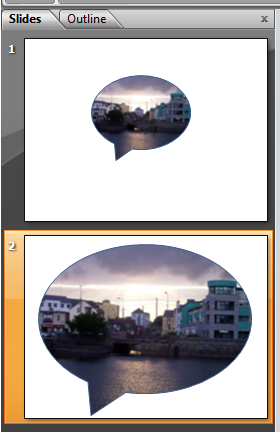
You can monitor the results of different settings in PowerPoints slide thumbnails (on the left hand side, if you have it showing), or by dragging the pop-up menu to a different place in the screen so that you can see the shape itself.


Job Done - at this point, you have an image that is cropped to the shape that you chose - now you just have to put it into your blog.


Using the picture


There are (at least) three ways to get the shape-cropped-picture from PowerPoint into your blog.

I usually copy the item from PowerPoint, and then paste it into a picture editor (Paintbrush etc), manually.   This is an old-fashioned approacb - but it lets me adjust the size and position of the image, and save it (usually a .png) with a file-name that describes the image really well which is good for mating the blog come up in search results (SEO).   The this picture can be inserted into a post just like any other picture.

Another option is to choose File > Save As from Powerpoint, and choose to save the slides in an image format, eg JPEG which can also be inserted into a post in the usual way.  You are likely to be asked whether to put all the slides in one image, or to make one image per slide. Usually, it would be best to make one image per slide - but I don't use this method because the image that is created is the size of the whole slide, rather than just the pictures on it.

A third option is to display the PowerPoint file as a slideshow. This isn't something that I'd do for only one shaped image, but may be relevant in some situations.


Adjusting the size and quality of the picture


One thing that you don't have any control of inside PowerPoint is the zoom level of the inserted picture.

If you make the shape larger, it doesn't show a larger proportion of the picture. Instead, it just shows the existing picture in a larger size, as you can see in the slides shown here.

I suspect that if you want to zoom in to a particular area of the image file, the only approach is to edit the picture in another tool, crop out the bit that you do not want to show, and only keep the part that you want to include inside your shape.

However PowerPoint does have some limited control over the contrast and brightness of the picture, from the Picture tab of the Format Shape window.


Can you do this in other tools?  Why PowerPoint?


Yes, you can.

Photoshop, and similar commercial tools almost certainly have features like this, and I'm certain that GIMP (like a public-domain, less powerful version of Photoshop) and Inkscape (another public-domain image program which is more focussed on scalable-vector-graphics and objects than on pixels) also have these features.

So why use PowerPoint?   In short, its (relatively) cheap and many people have access to it already.   It's also very easy to learn, compared to the other packages, and what you learn is likely to apply to lots of tasks and not just in making pictures for your blog.


Related Articles:


Putting a picture into a blog-post

Post.thumbnail and post.summary - ways of describing blog posts

Showing a PowerPoint slideshow in Blogger

Copyright, blogs and Blogger/Google
Read more > How to put pictures into unusual shapes, using PowerPoint
 
 
Copyright © blog
Blogger Theme by Blogger Designed and Optimized by Tipseo