Tuesday, January 24, 2012

Blogger-HAT Lite: quick updates about Blogger and related tools

Introducing Blogger-HAT Lite - quick notes about changes in other products that are important for Blogger users to know about.


Today, I'm officially launching Blogger-HAT-Lite - a new blog where I share quick notes about changes in product other than blogger, which I think Bloggers may be interested in, or definitely need to know about.

All Blogger-hints-and-tips readers are invited to visit the site, subscribe by RSS or subscribe to by email.


More than just buzz ...

Blogger-HAT-Lite is not about repeating brigth-and-breezy announcements from other services.
Instead, it aims to:
  • Filter these, so that only ones with (possible) implications for Blogger users are reported
  • Suggest questions that need to be asked and issues that need research about the effect on Blogger integration
  • Link to information about related topics - especially ones that talk about consequences that the people making the original changes may not have thought about.


... but less than fully-researched articles

I started Blogger-Hints-and-Tips for my own notes about Blogger, especially  problems that I couldn't find the answers to by googling.

It was also a test-bed for tools like Analytics that I wanted to use on my main blog, but needed to try elsewhere first. After installing it, I notice that other people were looking for the same answers - and when they googled, my notes were what they found.

I quickly found that the most interesting topics were about making Blogger "play nicely" with other products, rather than Blogger itself.  At the same time, I aimed to spend 15 minutes/day answering questions in the Blogger Help Forum - to say thanks for all the help I received when I was getting started.

Typing the same answers over and over got tedious, and when I found something new later on that would have changed a previous answer, it wasn't feasible to find the earlier answers and update them. So I started writing articles about things that people were asking for help with, so I could just link to the article from the discussion.

So I started researching and writing longer articles with the background, solution and the wider  consequences (what will you see? what do your readers see? what else do you need to think about?).

These articles can become out-dated due to changes the other product, that I might not notice. So I started reading the official announcements about Picasa, AdSense, Analytics, Gmail, Maps, etc - so that I knew what was changing, and could think about the effect on my own blogs, and Blogger-Hints-and-Tips.
Right now, I have 230 potential article topics, and 130-ish articles that need updating for the new Blogger interface - just as the recession has eased and I have a full-time day job. Simple math shows that I'm not going to be able to write articles that meet my research standards, in the time now have. And I keep seeing new things that I'd would love to explore but know I won't get around to.


So Blogger-HAT-LITE is:
  • A home for quick notes about these issues
  • A way to keep track of interesting things I see,and 
  • A place to share interesting-but not-fully-researched updates with my readers.


What's covered:

Blogger users could use hundreds of other products in conjunction with theeir blogs. Any spammer could set up a feed-based site that searches other sites for the word "blogger" and reposts the results.

Instead, I've selected a group of products to monitor: ones that I use and recommend, and which I a know a lot of Blogger-users use. So far the list includes:
Picasa
Youtube
Gmail
AdSense
Analytics
AdWords
Google Custom Search Engines
Feedburner
Google Affiliate Network
Webmaster Tools (Webmaster Central)

And these (currently :-)  non-Google products:
Chitika
LinkedIn
Facebook
Twitter
Amazon Associates

More will be added as I start using more products, or discover announcements-blogs for existing ones (eg Google Maps).

Are there any other tools you would like me to keep an eye on, so I can think about whether changes in them affect Blogger? Leave a comment below ...


Stay up to date:

You can visit the Blogger-HAT-Lite now (don't expect stunning graphics etc - this is a site for news, not design).

Or sign-up to read the Blogger-HAT-Lite RSS feed in a feed-reader , or  get updates email.

The most-recent articles from Blogger-Hat-Lite are in a widget here on Blogger-Hints-and-Tips: it's currently in the sidebar just under the subscription options, but may around as I experiment with things.

For the moment, I'm not going to give it a separate social media presence: I'm planning to share both Blogger-hints-and-top and Blogger-HAT-Lite updates in the existing Facebook or Google+ pages and Twitter account. (This may change if enough people ask for it, though.)

Thanks for reading, I hope you find the new site useful.


Related Articles:


Why RSS is important for you blog

How to share your posts to a Facebook page (and not an individual profile).

Understanding the follow-by-email gadget and Feedburner.

Other products that bloggers use with their blogs
Read more > Blogger-HAT Lite: quick updates about Blogger and related tools

Jeep Wrangler 2012

WranglerNum mercado de variedade tão grande, o desejo natural do cliente é comprar um carro que tenha o maior destaque possível nas ruas. Afinal, quem não gosta de ver os pescoços alheios se virando para o seu carrão novo? É provavelmente este espírito que impele a Jeep a vender o Wrangler 2012. Porque por mais valentia que ele tenha no off-road, é difícil que alguém coloque um carro de R$ 129.900 na lama sem nenhum receio. Não foi dessa vez que ele trouxe mudanças visuais, mas sim um novo motor bem interessante.

Por mais modernizado que ele tenha sido ao longo dos anos, todo Wrangler que se preze sempre terá as linhas quadradas, no melhor estilo Land Rover Defender. É a marca registrada do modelo, usada para tentar relembrar a época dos ancestrais Willys, jipes que retiravam o foco da estética e conforto para aplicá-lo intensamente na desenvoltura fora-de-estrada. Ele procura remeter a este subsegmento, em vez de uma variante mais familiar como o Fiat Freemont, moderninha como um Kia Sportage ou mais requintada como um Range Rover Evoque. É um carro que só agrada a quem realmente gosta deste estilo de vida mais aventureiro e despojado.

Jeep WranglerSua cabine não apresenta nenhum destaque em luxo ou sobriedade, mas sim em aspectos como o enorme espaço que se pode criar na versão de quatro portas, chamada de Unlimited (R$ 139.900), ao rebater os bancos traseiros. E este espaço ainda tem o diferencial de que a parte de trás do teto é removível assim como todo o teto, o que compõe um carro bem agradável de se levar à praia com amigos. A grande novidade é que este suposto trajeto de estrada vai ficar bem mais animado com o tal novo motor. O Wrangler agora usa o 3.6 V6 Pentastar compartilhado por outros modelos do grupo, como o Dodge Journey. Desenvolve 284 cv e está comandado por um câmbio automático de cinco marchas.

Read more > Jeep Wrangler 2012

Monday, January 23, 2012

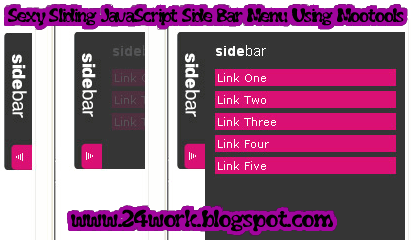
Sexy Sliding JavaScript Side Bar Menu Using Mootools

Show- hide, Smooth sliding and sexy. Menu bar with javascript and mootools. This post explains how to add Sexy Sliding JavaScript Side Bar Menu Using Mootools Widget on his blog that looks good on your blogspot blog.Be effective CSS vertical menu with show / hide uses MooTools to show / hide the menu with a vertical slide-in/slide-out nice effect.

About MooTools: "MooTools is a compact, modular, Object-Oriented JavaScript framework designed for intermediate to advanced JavaScript developer. It lets you write powerful, flexible, cross-browser code with its elegant API, well documented and consistent. ".
MooTools Home: Home Mootools.


How to Install Beautiful Sliding JavaScript Side Bar Menu Using Mootools


Now let's start adding it...

Step 1. Login to Your Blogger Account.Go to your Blogger Dashboard.Click on Layout tab from left pane and click on Add a Gadget link.

Blogger Tips And Tricks|Latest Tips For Bloggers

Step 2. After click on Add a Gadget link A pop-up box will open now
with many gadget list, Choose HTML/JavaScript from the gadget options by clicking the blue plus sign for that gadget.

Blogger Tips And Tricks|Latest Tips For Bloggers


Step 3. Select 'HTML/Javascript' and add the one of code given below.

Step 4. Now Click On Save 'JavaScript' You are done. ..............


<script src="http://safir85.ucoz.com/bdlab-blogspot/24work/side-bar-menu/prototype.js" type="text/javascript"></script>
<script src="http://safir85.ucoz.com/bdlab-blogspot/24work/side-bar-menu/effects.js" type="text/javascript"></script>
<script src="http://safir85.ucoz.com/bdlab-blogspot/24work/side-bar-menu/side-bar.js" type="text/javascript"></script>
<a href="http://24work.blogspot.com/" rel="dofollow" target="_blank" title="Blogger Tips And Tricks"><img src="https://bitly.com/24workpng" alt="Blogger Tips And Tricks" border="0" style="position: fixed; bottom: 10%; right: 0%; top: 0px;" /></a><a href="http://24work.blogspot.com/" rel="dofollow" target="_blank" title="Blogger Tricks"><img src="https://bitly.com/24workpng" alt="Blogger Tricks" border="0" style="position: fixed; bottom: 10%; right: 0%;" /></a><a href="http://24work.blogspot.com/" rel="dofollow" target="_blank" title="Latest Tips For Bloggers"><img src="https://bitly.com/24workpng" alt="Latest Tips For Bloggers" border="0" style="position: fixed; bottom: 10%; left: 0%;" /></a>
<style>
body{
font-size:75%;
}
a{
outline: none;
}
a:active{
outline: none;
}
#sideBar{
text-align:left;
}
#sideBar h2{
color:#F0FFFF;
font-size:110%;
font-family:arial;
margin:10px 10px 10px 10px;
font-weight:bold !important;
}
#sideBar h2 span{
font-size:125%;
font-weight:normal !important;
}
#sideBar ul{
margin:0px 0px 0px 0px;
padding:0px 0px 0px 0px;
}
#sideBar li{
margin:0px 5px 5px 10px;
padding: 0 0 0 10px;
list-style-type:none;
display:block;
background-color:#DA1074;
width:177px;
color:#FFFFFF;
}
#sideBar li a{
width:100%;
}
#sideBar li a:link,
#sideBar li a:visited{
color:#FFFFFF;
font-family:verdana;
font-size:100%;
text-decoration:none;
display:block;
margin:0px 0px 0px 0px;
padding:0 0 0 20px;
width:100%;
}
#sideBar li a:hover{
color:#FFFF00;
text-decoration:underline;
}
#sideBar{
position: fixed;
width: auto;
height: auto;
top: 140px;
left:0px;
background-image:url(https://blogger.googleusercontent.com/img/b/R29vZ2xl/AVvXsEhxD6Ta7VltvliQnjVwnuAOstQmEAmYMWQX4mNuVwEtx6hnr5BV-3KbrAZ_MOh6VZrf489TW2FGCwPDAlCNuld6P-lA2_Hx3hkLUAyFyGfFN9VwcSMXXpqgh4LbdsA0BSB8fHbS40EjN2TX/s320/left.collapse.border.png);
background-position:top right;
background-repeat:repeat-y;
}
#sideBarTab{
float:left;
height:137px;
width:28px;
}
#sideBarTab img{
border:0px solid #FFFFFF;
}
#sideBarContents{
float:left;
overflow:hidden !important;
width:200px;
height:320px;
}
#sideBarContentsInner{
width:200px;
}</style>
<div id="sideBar">
<div id="sideBarContents" style="display:none;">
<div id="sideBarContentsInner">
<h2>Left<span>Menu</span></h2>
<ul>
<li><a href="#">Link One</a></li>
<li><a href="#">Link Two</a></li>
<li><a href="#">Link Three</a></li>
<li><a href="#">Link Four</a></li>
</ul>
</div> </div>
<a id="sideBarTab" href="#"><img alt="sideBar" src="https://blogger.googleusercontent.com/img/b/R29vZ2xl/AVvXsEhloNpst4XV1nUe-XOk89YZS9zsN_BD23n3Zv88z8Q6kMCRl_FgCCX8W0UC4_i_8Os3dq83VrF6jE-ANotw95HjSQgbJQbS2Vl9-aHKgRJ1hrdj9cP2J028r1Vqvz8zEsfRBUEPBvyyMD3y/s320/sidebarcollapse.png" title="sideBar" /></a>
</div>


And now click Save


Note: Keep in mind that before a save above "#" of land and your link Link One, Link Two, Link Three Link Four, and the name of the place you need to do is save.And here is the link I used to have 4, you can link up to 10


Read more > Sexy Sliding JavaScript Side Bar Menu Using Mootools

Peugeot 408 Griffe THP

408Uma parte muito interessante do desenvolvimento de um carro novo é definir sua personalidade, o foco que o modelo terá ao chegar no mercado. Isto é importante porque norteia a forma como o público o verá. Ou seja, se será o modelo buscado pelo luxo, pelo desenho sedutor, desempenho especial ou mesmo baixo custo. A Peugeot é conhecida mundialmente pela esportividade de seus modelos, então aliar o requinte do 408 Griffe com o motor turbinado resultou num modelo com chances de vender muito bem.

Peugeot 408 Griffe THPO desenho do carro preserva as linhas equilibradas e estilosas sem receber adereços ou cores berrantes, e na verdade isso é uma vantagem. Na Argentina ele foi lançado como 408 Sport, mas a filial brasileira preferiu fugir do seguro mais caro que se costuma cobrar por versões que se declaram esportivas. Ficou mais ou menos a receita que a Fiat usou na versão T-Jet do Linea, em que a turbinada vende menos mas ganha ar de exclusividade, em vez de investir em extravagâncias de desempenho e visual que fugiriam da elegância sóbria que a clientela deste segmento costuma buscar.

A versão Griffe THP traz um conjunto mecânico excelente. O motor é o mesmo usado por 3008 e RCZ, um moderno 1.6 16v turbo de 165 cv que neste modelo de peso mediano garante 0 a 100 km/h em 8s3 e máxima de 213 km/h com câmbio automático sequencial de seis marchas. E isso combina muito bem com o farto pacote de itens que ele oferece: ar-condicionado digital bizona, direção eletroidráulica, seis airbags, sistema de som multimídia, GPS, bancos e volante revestidos em couro, alarme, freios com ABS e controles eletrônicos para estabilidade e frenagem. Tudo de série, e pelos mesmos R$ 81.490 da Griffe 2.0 16v, permitindo ao cliente escolher entre motor turbo ou flexível.

Read more > Peugeot 408 Griffe THP

Friday, January 20, 2012

The Page gadget: a menu bar for your blog, with links to just about anywhere

This article shows how you can use the Pages gadget as a general purpose menu bar for your blog.

Evolution of the pages gadget 

Based on a work by latvian (evolution)
 [CC-BY-2.0], via Wikimedia Commons
When Blogger first introduced so-called "static" pages, I thought they had a lot of potential.

As I investigated, though, I came to the conclusion that they were more trouble than they were worth, so I recommended abandoning them and just using posts.   Or at least abandoning the Pages gadget - even I sometimes use a Page for things that I don't want to send out in my RSS feed, eg custom-search-engine results.

But when the September-2011 version of Blogger  was introduced, the Pages gadget got a new feature:  now, it can include links to any website URL, not just your own pages.  

This makes it a lot more versatile - even though the effect is just the same as adding a Link-list gadget and putting it into the right area of the blog-layout.


How to add general web-links to your Pages gadget.

Make sure you are using the new (ie Sept 2011) Blogger software.  
(Get to it with the "switch to updated version" link if you're not - you can always go back later with the item in the gear-wheel menu, or the link on my sidebar)

Go to the Pages tab of your blog's dashboard.

Click the drop-down arrow beside New Page:


Select web-address

Enter the title that you want to show up on your menu bar  (phrases with spaces are allowed, some special characters may not be).

Enter the URL which should be opened when someone clicks on the new menu-bar item   (make sure the web-site address starts with http:/  )


Click Save

You can change the order of the items in your menu bar by picking them up using the "grab bar" to the left of the item name, and drag-and-dropping them up or down the list of menu-bar entries.


When your menu-bar items are in the right place, click Save Arrangement in the top right corner of the window.


What your readers see ...

Visitors to your blog will see a menu bar either at the top or the side depending on where you put your pages gadget.

Most readers will think that the items in your menu bar will take them to "pages" in your blog.   Iif they hover over an item in the bar, they will see the web-address it is linked to, in the same way that their browser usually shows this   (eg in Chrome, I see it in faint text at teh bottom left of the screen).

This will work well if the web-addresses you have added are within your own blog (eg search-labels, if you are using this approach to putting your posts into pages).

But it may be confusing if you've put in links to other websites, or invalid links   (remember, there was no "test this link" option when you were adding the web-site URL to link to).

Currently I do not know any way to make pages-gadget links to external websites open in a new browser window.    (If you know a way, the comments area is just below - please share!)


The Pages-gadget vs a Link-list

When the Pages-gadget was first introduced, they were just like regular linked-list:   the magic was that Blogger introduced a new area in the templates where linked-lists are formatted differently.

This is still true to a great extent.   But on blogs viewed with dynamic templates, the presence of a Pages gadget causes the layout to be a little different.  

I haven't tested it thoroughly, but I suspect that the presence of a link-list gadget on the template (remember, you cannot currently add gadgets to dynamic template blogs)  would not have the same effect.  

This makes me suspect that Blogger may introduce some other enhancements based on the Pages gadget, so it may be worth using them instead of Link-list gadget in the future, so as to get the benefit of these changes when they eventually happen.


Related Articles:


Putting your posts into Pages

Making your links open in a new browser window or tab

Adding a search tool to your blog

Adding gadgets to dynamic view blogs

Blogger'sPages are more trouble than they're worth

The difference between posts and pages

What are dynamic blog templates?
Read more > The Page gadget: a menu bar for your blog, with links to just about anywhere

Picnik is ending on 19 April 2012

The first list of Google application retirements for 2012 includs Picnik, a photo editing tool that was accessible via Picasa-web-albums (and perhaps from other places too) - it was an effective, though slow, way of adding a watermark to pictures.

I'm sure that PWA has a replacement tool for doing this ... don't have time to research what it is right now.
Read more > Picnik is ending on 19 April 2012

Google Search has a penalty if you don't have "enough" content above the fold

Google search have changed their search-formula:   sites with "not enough" content above the fold won't rank as high in search results as they did before - effective from the next time the blog is crawled.

So be careful about just what gadgets you put above your blog's header:  it may not be such a good idea if you rely on search for a lot of your blog visitors.

(Yes there is a certain irony that Blogger-HAT's Followers gadget is up there at the moment - but it's a short-term experiment to see how much difference it makes to my follower numbers.   So far, one week has seen a 10% increase!)
Read more > Google Search has a penalty if you don't have "enough" content above the fold
 
 
Copyright © blog
Blogger Theme by Blogger Designed and Optimized by Tipseo